
How Company Certification Has Evolved
Ten years of BIM certification experience. Learn how ISO 19650 certification has matured, its business benefits, and when organisations are ready.


I frequently get told that safety factor plots results within Nastran In-CAD are not correct. The reason for this is that safety factor values are calculated in a slightly different way.
The following example best explains this. I will use 200MPa for yield limit for comparison purposes
Safety factor calculation based on average stress at location A is 20.51

Average Stress value = (10+12+9+8)/4 = 9.75
Safety Factor = 200/9.75 = 20.51
Safety factor calculation based on how Nastran In-CAD displays plots at Location A is 20.97.
Safety Factor for Element 1 = 200/10 = 20
Safety Factor for Element 2 = 200/12 = 16.667
Safety Factor for Element 3 = 200/9 = 22.222
Safety Factor for Element 4 = 200/8 = 25
Average Safety Factor = (20+16.667+22.222+25)/4 = 20.97
So, this is the reason why there is a slight difference in the safety factor results. Both results are correct as they have been calculated in slightly different ways. It is entirely up to you which value you take.
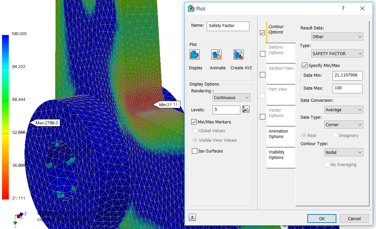
Here a safety factor display is showing a minimum value of 21.11.
Note changing Data Type to Corner or Centroidal will yield the same safety factor result.
So, for the same model and results if we display the average centroidal results the maximum stress value becomes 9.4381MPa.
So, based on this value the factor of safety (hand calculation) is 21.19.
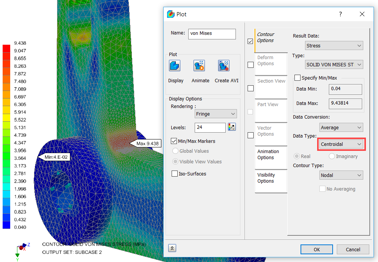
This is very close to the Safety Factor plot value of 21.11 with a difference of less than 0.5%.
I hope you have enjoyed this series. If you need any further information please complete the form.
Ten years of BIM certification experience. Learn how ISO 19650 certification has matured, its business benefits, and when organisations are ready.

Digital transformation is reshaping the built environment, but successful change requires more than new technology. Discover how Symetri's approach to BIM, digital delivery and organisational change has earned four nominations at the 2026 Building Innovation Awards.
If you're new to Bluebeam Max or simply want to learn more about what it can do, we've gathered answers to the questions we're asked most often.