
How Company Certification Has Evolved
Ten years of BIM certification experience. Learn how ISO 19650 certification has matured, its business benefits, and when organisations are ready.


It’s a very exciting time with the recent release of Autodesk Revit 2024.
My particular interest was to see the inclusion of Twinmotion. If you are familiar with my previous blog, I spoke of the Twinmotion plugin to Autodesk Revit 2023 and looked at how to install the Datasmith plugin within Revit and the workflow between Revit 2023 and Twinmotion 2022.
I was pleased to see that Revit 2024 and Twinmotion 2023 have greatly improved the connectivity between each other. This blog post will demonstrate what has changed.
Opening Revit 2024 and seeing that it now has the dark interface available is perfect for a CAD and CGI visualiser. This is now in line with AutoCAD, 3DS Max and Unreal Engine and makes a huge difference to colour optimisation in a creative workflow.
On to Twinmotion. The good news is that Revit Access to Twinmotion allows you to download the 2023 version of Twinmotion. This has a great deal of improvements, which I will go over in my next blog.
From the Products and Services page on your Autodesk login, go to the Twinmotion Access. Activating the Twinmotion access sends you to the Twinmotion.com webpage where you will be able to download the new 2023.1.0 Twinmotion release.

Remember that Twinmotion requires good GPU (Graphics Processor Unit) as mentioned on the Check System Requirements on the download page. Particularly in respect that the Path Tracer requires, for example an Nvidia RTX 2000 or above.
Download the Twinmotion 2023.1.0 and install it.
There is no need to install the Datasmith plugin on Revit 2024. Open your Revit and have the project available. On the view tab you will now see Twinmotion.
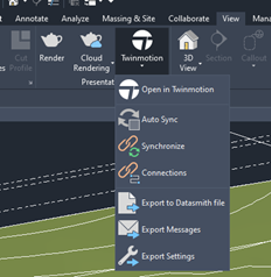
The options are now here to Open in Twinmotion, Synchronise and Export. Select the Open option in Twinmotion and this will send the model directly to Twinmotion, providing of course that it is installed as just mentioned.
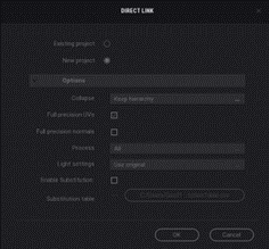
Use the option New Project, as this is the initial import to Twinmotion.
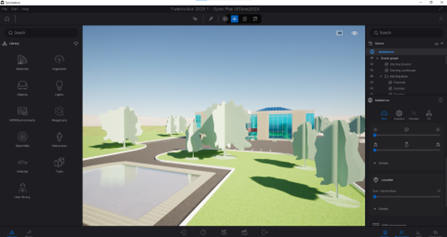
If you save your Twinmotion project, it will be linked to the Revit project. Therefore, if you make additions and revision to the Revit Project, it can be synchronised to the Twinmotion project.
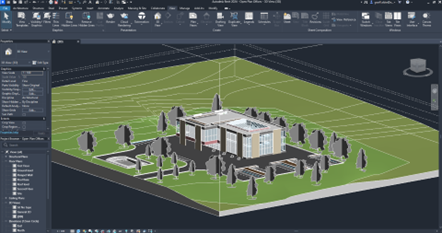
It really is fantastic to have this connectivity with Revit and Twinmotion to aid conceptual visualisation in an evolving workflow, as I see Twinmotion as an integral part of Autodesk Revit.
Twinmotion is now in the View tab as its own presentation feature and not considered an external plugin on an additional tab.
In Revit, Twinmotion is clearly a huge improvement to the presentation of a project.
The ability to Auto Sync, but still have the option to export to Datasmith is a huge benefit as the Revit project can continue to Unreal Engine for additional immersive features.
Once again, the Autodesk Access to Twinmotion allows all the features of Twinmotion direct from the Epic Games launcher, but still restricts the cloud-based features.
I have been experimenting quite a bit since Twinmotion 2023.1 and Revit 2024 have been released, and I can certainly see the workflow from project design to presentation are fluid and maintain conceptual design continuity with the Auto Sync feature in Twinmotion.
Ten years of BIM certification experience. Learn how ISO 19650 certification has matured, its business benefits, and when organisations are ready.

Digital transformation is reshaping the built environment, but successful change requires more than new technology. Discover how Symetri's approach to BIM, digital delivery and organisational change has earned four nominations at the 2026 Building Innovation Awards.
If you're new to Bluebeam Max or simply want to learn more about what it can do, we've gathered answers to the questions we're asked most often.