WHATS NEW IN THE LATEST AUTODESK RELEASE

What’s New in Inventor 2027: A Guide to the Latest Features

Autodesk Inventor 2027 leans heavily into AI and automation, with Autodesk clearly focusing on tools that reduce repetitive tasks and make it easier for designers and engineers to work smarter, not harder. The update includes improvements across the platform, from Content Centre enhancements to visual coding tools, and the introduction of Autodesk Assistant, an AI agent built directly into Inventor. Alongside these major updates come several smaller but genuinely useful additions, including a redesigned slot tool and better ways to work with point cloud data.

What’s New in Inventor 2027: A Guide to the Latest Features

WHAT'S NEW IN INVENTOR

One of the standout updates is the ability to publish and use assemblies inside the Content Centre. Until now, Content Centre has been a library of standard driven part files like fasteners, fittings, washers, and components used in the Tube & Pipe and Frame Generator environments. With Inventor 2027, Autodesk has added a publish option that supports the use of assemblies in the content centre. It now becomes possible to store default assembly starting points, such as a core product that gets customised regularly or commonly reused purchased assemblies. The placement options remain familiar, allowing assemblies to be placed as standard or custom items. It’s a subtle change, but one that gives Content Centre a new relevance.

iLogic also receives a meaningful upgrade with the introduction of Codeblocks, a visual block based way of creating iLogic rules. This approach will feel familiar to anyone who has used Blockly or similar visual coding environments, making rule creation far more approachable for designers without a programming background. Codeblocks separate user input from model actions, improving readability and making rules easier to maintain. For teams building configurators or option driven models, the clarity and accessibility these blocks offer will likely encourage far wider use of iLogic across organisations. Importantly, the system still generates text based rules in the background, so experienced users don’t lose any flexibility.

The most significant change to this release is Autodesk Assistant, the AI agent now built into Inventor and several other Autodesk products such as Vault, Revit, and Fusion. Rather than acting as a simple help tool, the Assistant can interpret natural language instructions and directly interact with the model. It can adjust iProperties, modify parameters, manage Model States, create PDF drawing packs, run iLogic rules, draft supplier emails. Because the assistant can access the Inventor API, many of the tasks users once had to script manually can now be triggered by a simple prompt. The tool also stores conversation history, making it easy to reuse prompts or create predefined commands. 
Among the additional tools worth noting is the new slot feature. Slot creation is now more intuitive, using a modernised property panel similar to the hole command. Designers can define slot size, orientation, and placement more efficiently, and the feature works consistently across part and assembly environments. Slot annotations are also available in drawings, making the workflow more complete from design through to documentation.


Point cloud management has also been improved, offering smoother navigation and better control. Users can now create section views directly from point clouds, adjust point sizes through the navigator, align coordinate systems, and undo crop operations. Inventor 2027 also allows point clouds to appear on drawings, which makes documenting scanned environments significantly easier.
Alongside these headline features, the release also supports workflows like sketch driven assembly patterns, new options for managing assembly folder structures, and improved interoperability between Inventor and Revit. Altogether, Inventor 2027 feels like a focused, well rounded update that enhances automation, increases accessibility to advanced tools, and introduces AI driven workflows that will only get stronger over time. 


To complement these new capabilities, it’s also a great time to take advantage of our training opportunities. Whether you're looking to deepen your expertise with Inventor or explore cloud connected workflows in Fusion, we’re offering an exclusive 25% discount on any Inventor or Fusion training course booked before 1st June. When booking a training course on our website please use discount code:
INVENTOR27 or FUSION27


Mirror Enhancements

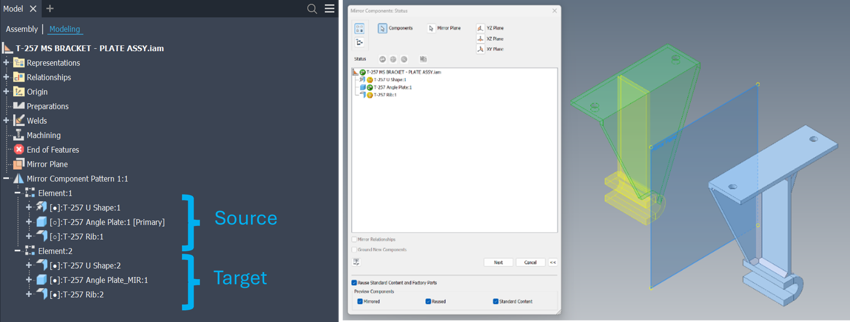
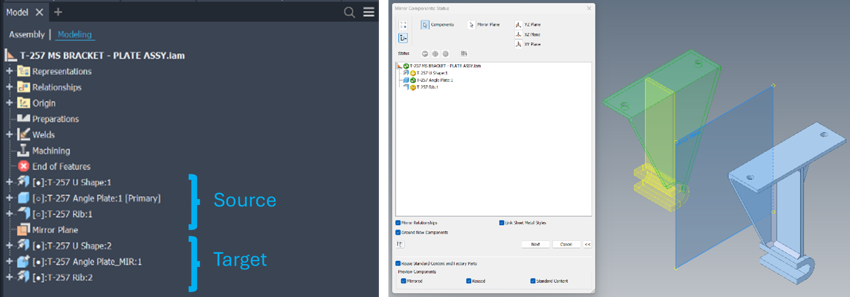
The Assembly Environment Mirror functionality has been enhanced enabling users to select an option that allows both geometry and position of the source components available in the resulting mirrored components/assemblies. These target components remain associative and therefore any changes made to the source components are reflected as expected in the target components.

Create Mirror Pattern  

Create Mirror Pattern enables the user to mirror the geometry and position of selected source components. This option preserves the associativity between source and target components. This command selection places the newly generated mirrored components in a newly created mirror browser node. All styles associated with the source component are synced with the new target components and the need for mirror relationships and grounding of new components are greyed out and therefore no longer required. Users will still see the MIR post or Prefix naming convention showing that specific components are a true mirrored version of the source component.

Create Flat Structure 

Create Flat Structure creates mirrored geometry only and has no associativity between the source and target components. Also, no browser node is generated. Users will also need to ensure that the mirrored relationships, ground new components and link sheet metal styles are selected to ensure the target components fully match the source components in style and position.

However, if you have used parametric modelling techniques and derived sketch geometry between components correctly when building reusable source components, any changes made to those source components are reflected in the target component should a size change occur.

Model State Enhancements

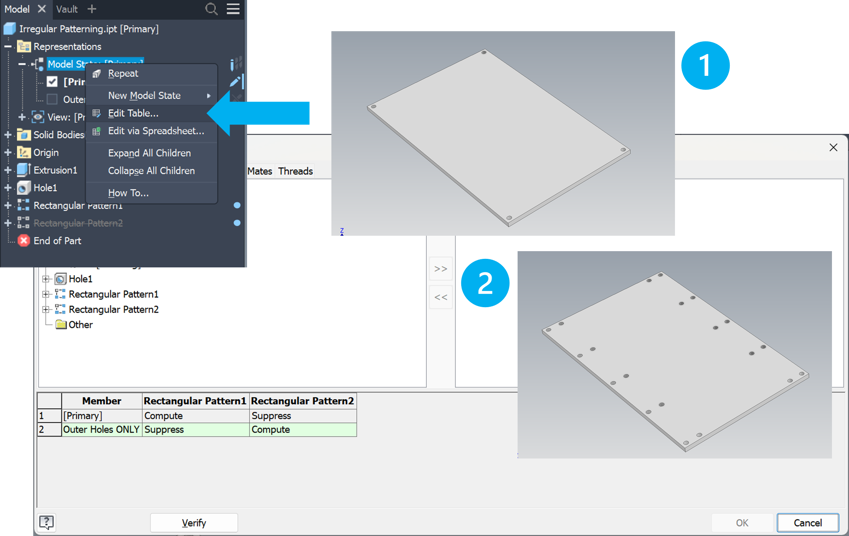
Model States have had a well needed upgrade driven by Autodesk Inventor Ideas Station submissions. Users can now perform edits to multiple models states at once, perform edits using the table editor similar to the iPart factory editing capabilities with also options allowing users to share or break shared Bill of materials (BOM) relationships.

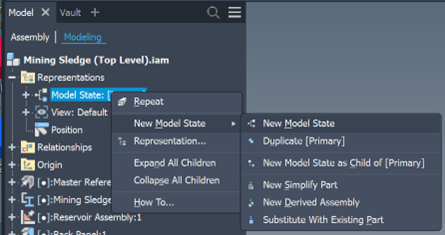
Model state functionality for assemblies, found inside the design browser has been consolidated into one menu and is found under the Representations design browser folder.

Now users have access to create New Model State and Duplicate, the New Model State as Child of [Primary] option and access to Edit table and Edit via Spreadsheet functionality.

Interoperability

Revit Interoperability Enhancements – Autodesk Inventor Professionals 2026 BIM Content Environment has been restructured and improved as new commands have now been added, further closing the design information gap between Manufacturing (MFG) and Architectural, Engineering and Construction (AEC) users heavily dependent on BIM related workflows.

Coordinate System and Component Placement.

With the introduction of the new Coordinate System ribbon panel, users now have the option to select either the UCS or enhanced Placement feature. 
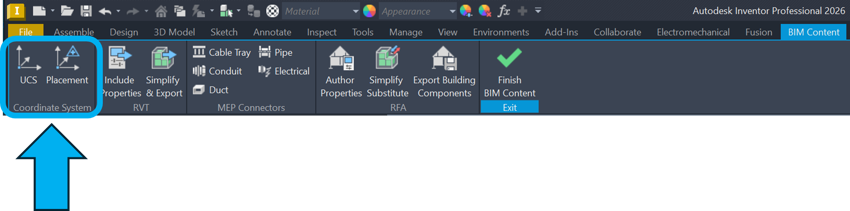
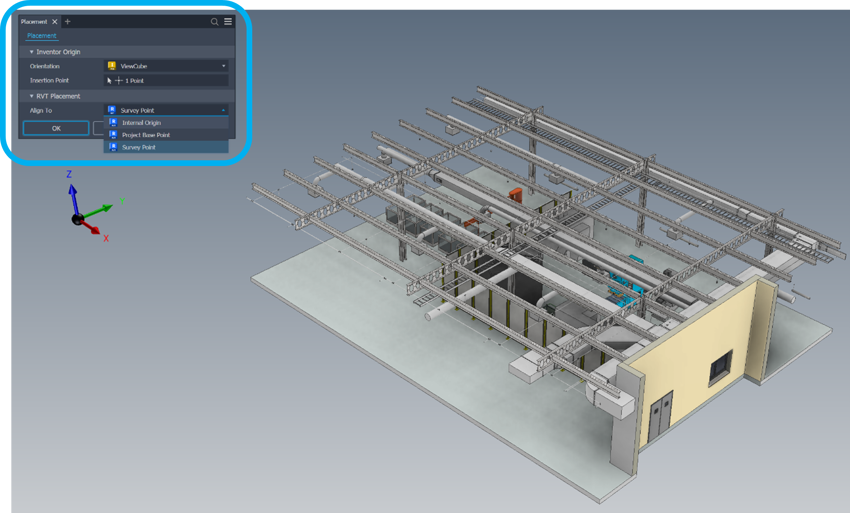
Placement allows the user to select the Inventor model orientation and insertion point that is then aligned with he selected Revit location in any exported RVT file. This command supports Revit versions 2023 and above.
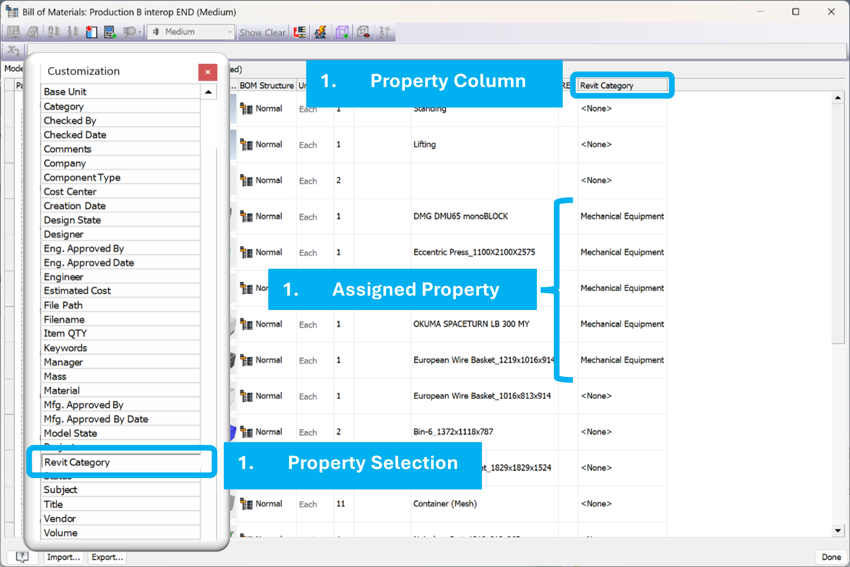
BOM Property Enhancements.

Cross Industry workflows just got an upgrade where Inventor Designers can now assign Revit Categories to BOM Items. This functionality helps prepare model property data that is then output to RVT or IFC BIM Export. Assigning the Customization property inside the Assembly Template ensures users have access to the category selection tool directly inside the Bill of Materials dialogue box.
Integrated with the new Inventor UI panel style, users can select a Default Category and desired iProperties needed for inclusion within the RVT export. Include Properties functionality is now available for Inventor 2025 and above users. This means that if a category was selected in the BOM related workflow, all other components can be quickly assigned a default category to ensure the correct category data is exported quickly and efficiently where needed.
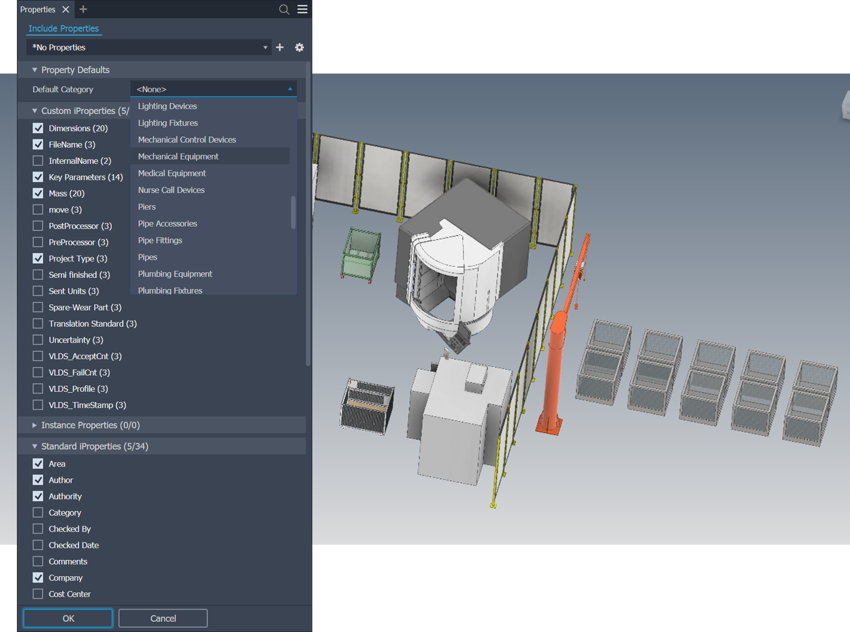
Include Properties gives users greater control over additional meta data being shared throughout the RVT export process. Linked directly to all variations of iProperties including Custom, Instance, Standard and Factory, important meta data needed to bridge the gap between visual design and the data needed for the execution and lifecycle management of a given project just got easier.
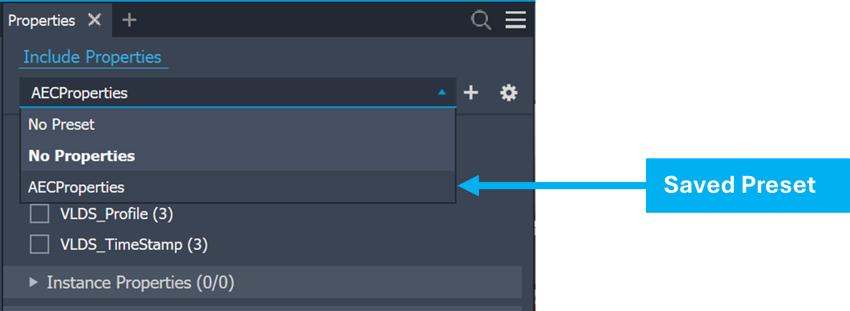
To help standardise the workflow further, Autodesk have introduced presets into this workflow, allowing engineers to save preset information, accessible via the preset’s dropdown at the top of the browser panel. This ensures a much leaner approach to the include properties workflow where key data is not missed in exported BIM related content.



Final Thoughts

This is also an ideal opportunity to learn how Sovelia Inventor can extend Inventor’s capabilities with powerful automation for documentation, property management and model updates, improving data consistency, and enhancing overall workflow efficiency. You can explore its full functionality by downloading a free trial.

If you have any questions please contact us .

FREE TRIAL With Sovelia Vault. Try it Now


Contact Us


How Bluebeam + GoCanvas Are Revolutionising Field Data Capture

27 February 2026

In construction, the gap between the construction site and the office has always been a challenge. But by combining Bluebeam’s powerful PDF markup tools with GoCanvas’s mobile forms, companies can finally achieve seamless documentation that flows effortlessly from site to office.

Which Bluebeam Studio Is Right for You? Cloud vs On-premise

25 February 2026

Collaboration is the backbone of modern construction projects. Whether you’re reviewing drawings, marking up RFIs, or coordinating across multiple stakeholders, having the right platform makes all the difference. This blog reviews Bluebeam Studio (cloud-based) and Bluebeam Studio On-premise. While both enable teams to work together on PDFs in real time, the choice between them depends on your project requirements, IT policies, and security needs.

21 Tips and Tricks for Bluebeam Revu Every User Should Know

24 February 2026

Bluebeam Revu is packed with powerful features that can dramatically improve efficiency in document review, markup, and collaboration. Whether you’re new to Revu or looking to sharpen your skills, these tips and tricks will help you unlock its full potential.