
How Company Certification Has Evolved
Ten years of BIM certification experience. Learn how ISO 19650 certification has matured, its business benefits, and when organisations are ready.


In this blog, our Principal Consultant Lawrence Hooker, explores the new 2026 structural features in Revit, with a focus on reinforced concrete detailing, steel detailing, and analytical modelling enhancements. As with previous versions, Autodesk continues to advance its structural capabilities, making significant improvements to detailing accuracy and workflow efficiency in these key areas.
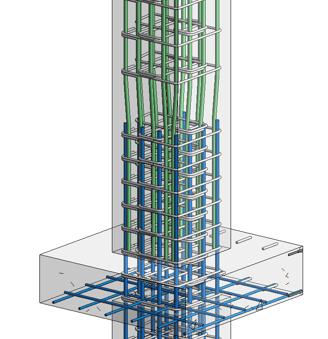
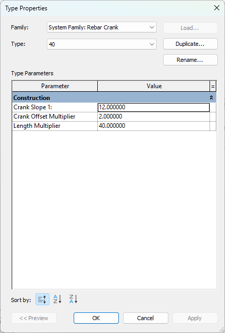
The primary feature in Revit 2026 for reinforcement is rebar cranking. This is a technique used in column construction with column-to-column intersections. The cranked rebars allow the main reinforcement to have the correct laps without causing congestion at the connection. Of course, in previous versions of Revit you could manually model the required cranked bar, but it was very time consuming and not easy to update.
The rebar crank is configured as a system family much like the lapping feature introduced in Revit 2025. This allows users to easily configure different cranked bar for cranks with differing column sizes or perhaps with specific lapping criteria. The cranked rebar can be accurately manipulated and adjusted with the Rebar Crank Length dialog.
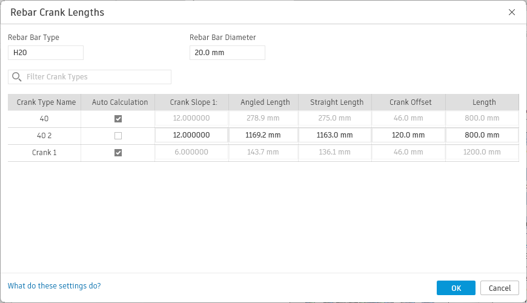
When using varying rebar, Revit will now correctly group bars with the same geometry in the same partition. Previously, each instance of the bar was scheduled individually leading to poor bending schedules.
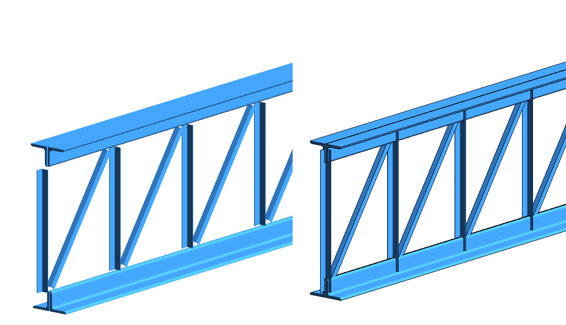
Autodesk continue to build out their steel detailing solution directly within Revit with a new method of modelling steelwork. Previously, the steel members would automatically cutback which was ideal for structural consultants who do not detail connections. This method results in a clash free model and produces acceptable looking steel drawings. However, when exporting the steel model as an IFC or transferring the model to Advance Steel, all the cutbacks then have to be removed and steel elements lengthened.
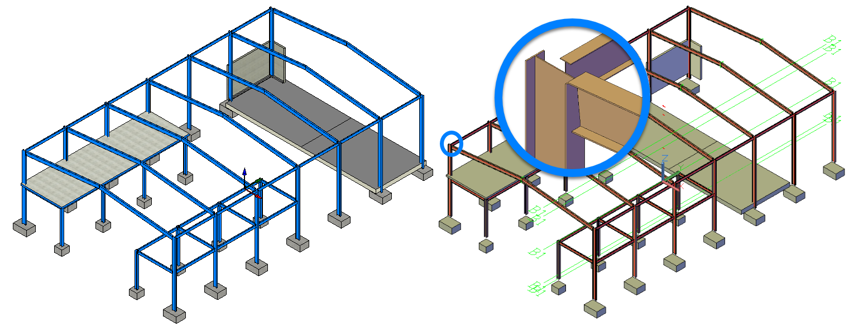
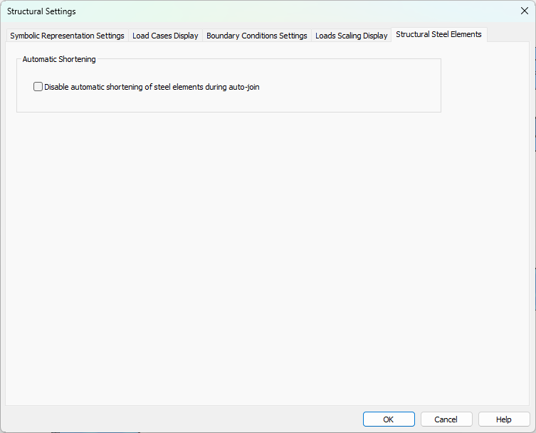
Revit 2026 has a simple solution which removes the cutbacks on all steel elements within the project. This feature can simply be toggled on and off to suit a specific IFC export or if you are going to detail the steelwork directly in Revit. This can be toggled in the dedicated Structural Steel Elements tab which is located in the Structural Settings dialog.
In the below image, you can see the before and after on this truss.
The structural toolsets in Revit 2026 continue to build on rebar and steel modelling leading onto a truly connected workflow between, engineers and specialist contractors. The vision is to have the design and fabrication data in a single format allowing true collaboration.
The core Revit 2026 features are also very compelling, especially with the new workflows to place and save view positions on sheets.
If you are considering moving across to full 3D rebar modelling and detailing solution in Revit, this new release gives you a great base and starting point. However, to enable faster rebar modelling and accurate bending schedules that conform to BS 8666:2020 you should consider using Naviate Structure and Rebar.
Ten years of BIM certification experience. Learn how ISO 19650 certification has matured, its business benefits, and when organisations are ready.

Digital transformation is reshaping the built environment, but successful change requires more than new technology. Discover how Symetri's approach to BIM, digital delivery and organisational change has earned four nominations at the 2026 Building Innovation Awards.
If you're new to Bluebeam Max or simply want to learn more about what it can do, we've gathered answers to the questions we're asked most often.