
Securing the Modern Workplace
Learn how to protect your organisation from QR code phishing, adopt passkeys securely, and manage AI note-takers with the latest IT security advice from Symetri.


In January 2020, Excitech was acquired by Addnode Group, the owner of Symetri, Europe’s leading provider of software and services for design and engineering activities.
Excitech has now become Symetri, operating as one company since the beginning of January 2021. Please rest assured it is business as usual for us and your service experience will not be impacted.

Here are some useful tips and tricks to get you started.
The Command Line
The command line has more to offer than just loading your commands for you. It can set the current Layer; insert the Block you need and prepare AutoCAD to place the desired Hatch pattern. (Make sure Dynamic Input is turned off. F12).
If I type, Layer, my Command Line suggestion list will offer me a choice of available layers.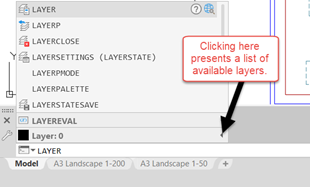
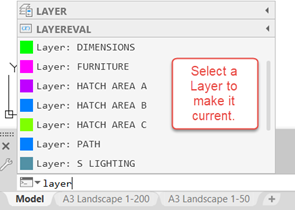
If I’d typed in the name of the layer, it, together with other similar layers, would have appeared too!
If I now type in the name of a Block, which is available within the drawing, the Command Line suggestion list will list the Blocks matching the name.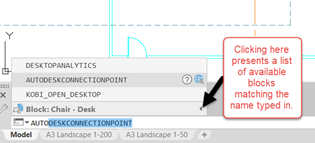
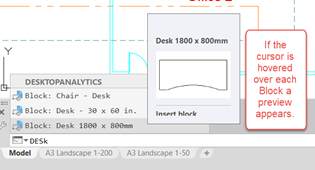
Typing in the name of a Hatch Pattern will also appear within a suggestion list, and when selected will automatically load the Hatch command.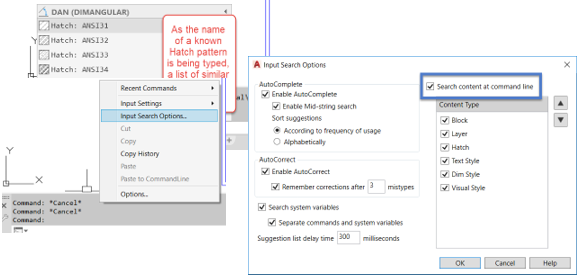
The ability for AutoCAD to do all of the above, and more, is configured within the Input Search Options Dialog box. There is a list of items which can be activated is this way. Right Click within the command window will provide access to this dialog box.
System Variables
So, while we’re in a typing mood, here are a couple system variables which you may find useful.
HPLAYER will set the layer to be used when the Hatch command is used. The name of an existing layer can be typed and used, or if the layer doesn’t exist AutoCAD will create it for future use.
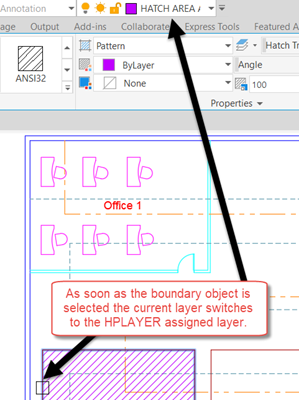
A similar acting system variable is DIMLAYER. It too will determine the layer used when activating any dimension command. If the layer exists already, AutoCAD will use it thereafter, if not, the layer is created for future use.

…and finally! “Why isn’t the Mirror command on my Right Click Menu after I’ve selected something? All the other usual suspects are!”
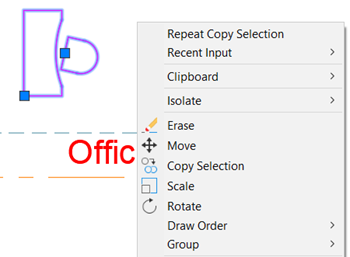
Where’s the Mirror?
Let’s get this sorted.
In AutoCAD, within the command line type CUI [Return].
Expand the Shortcut Menu section followed by the Edit Menu section.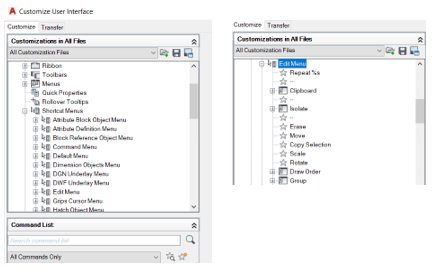
In the Command List section, bottom left, type Mirror within the search box.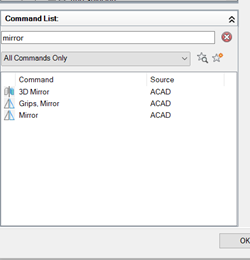
Click and drag the Mirror command up to and into the Edit Menu list just below the Rotate command.
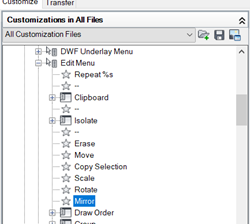
Now select OK to close the CUI dialog box. Select objects within the drawing, Right-Click and…...
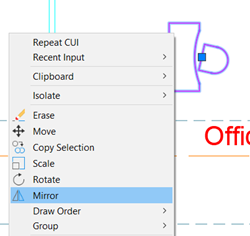
It’s sorted!!
That’s it for now. Hope you found these AutoCAD Tips and Tricks useful and you learnt something new.
Get in touch with us if you would like to find out more about our AutoCAD training courses. We offer AutoCAD training courses for mixed levels, including:
- AutoCAD Essentials
- AutoCAD Beyond the Basics
- AutoCAD Advanced
As well as a range of AutoCAD Civil 3D training courses.
Our AutoCAD training courses are let by experienced professionals who have come from the industry, so understand your challenges and how you use the software.
Find out more about your courses here:
Learn how to protect your organisation from QR code phishing, adopt passkeys securely, and manage AI note-takers with the latest IT security advice from Symetri.

Reduce downtime and improve service efficiency with AI-powered troubleshooting. Learn how service teams use ilean to solve problems faster and capture knowledge.

Cybersecurity risks are not always caused by sophisticated attacks or major system failures. In many cases, risk builds quietly through everyday habits, overlooked processes, and limited visibility into where data is stored or how users interact with systems.