Artificial intelligence is rapidly reshaping the construction industry. From automating repetitive tasks and improving project efficiency to enhancing collaboration and reducing risk, AI is helping construction professionals work smarter at every stage of the project lifecycle. As digital transformation continues to accelerate, organisations are increasingly looking for technologies that can streamline workflows, improve decision-making, and unlock new levels of productivity.
As a leader in digital construction solutions, Bluebeam is at the forefront of this evolution, recently introducing Bluebeam Max, an intelligent AI-powered assistant designed to help construction professionals work more efficiently, automate time-consuming tasks, and unlock valuable insights from project documents. By bringing artificial intelligence directly into Bluebeam workflows, Max enables users to quickly find information, summarise complex documents, and make more informed decisions, helping teams save time and focus on delivering successful projects.
If you're new to Bluebeam Max or simply want to learn more about what it can do, we've gathered answers to the questions we're asked most often.

What is Bluebeam Max?
Bluebeam Max is an AI-powered enhancement for Bluebeam Revu that helps construction professionals automate document reviews, analyse drawings, extract project information, and streamline workflows. By combining artificial intelligence with Bluebeam's trusted PDF collaboration tools, Max enables teams to work more efficiently, reduce manual effort, and make better-informed project decisions.
Key capabilities of Bluebeam Max include:
- AI-assisted document reviews with Smart Review
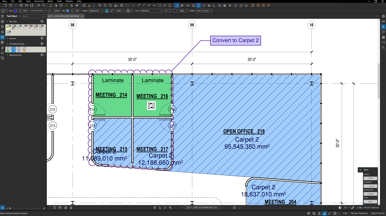
- Smart Overlay
- AI integration with tools such as Claude
- Stitching
- Magic Markups
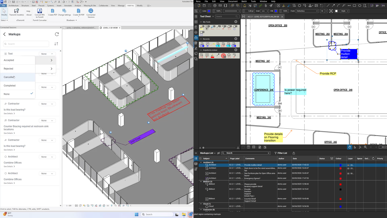
- Connected Studio Sessions with Revit
How does Bluebeam Max handle uncertainty and missing information?
Bluebeam Max analyses only the information available within the document being reviewed. When the requested information cannot be found or verified, it is designed to avoid making assumptions or generating unsupported answers. Instead, users are directed back to the source material, helping to maintain transparency and confidence in the results. This approach is particularly valuable in construction workflows, where accuracy, traceability, and document integrity are essential. By grounding its responses in the content of the document, Bluebeam Max helps teams reduce the risk of misinformation while supporting more reliable reviews and decision-making.
Does Bluebeam Max work with scanned and unstructured PDF drawings?
Yes. Bluebeam Max can work with scanned and flattened PDF drawings, helping teams gain insights from project documents even when they are not delivered in an ideal format. When text is not immediately selectable or searchable, Optical Character Recognition (OCR) can be used to convert the content into machine-readable text that Bluebeam Max can analyse. The effectiveness of the analysis depends on the quality of the source document and the accuracy of the OCR process. While the current version of Bluebeam Max focuses primarily on text-based analysis, it can still unlock valuable information from many legacy, scanned, and unstructured project documents. This capability allows teams to make better use of existing documentation, reducing the time spent manually searching through files and helping ensure important project information remains accessible throughout the project lifecycle.
Can Bluebeam Max find text that can't be highlighted?
Yes. If text within a PDF is not selectable or searchable, Bluebeam Max can still access that information once the document has been processed using OCR. OCR converts scanned or image-based text into machine-readable content, allowing Bluebeam Max to analyse and surface relevant information. This is particularly useful for older project documents, scanned drawings, technical specifications, and tables that may not have been created as searchable PDFs. Once OCR has been applied successfully, previously inaccessible content becomes available for search, review, and AI-powered analysis. By enabling teams to extract value from documents that would otherwise require manual review, Bluebeam Max helps improve document accessibility, reduce time spent searching for information, and support more efficient project workflows.
Does Bluebeam Max use text recognition or image recognition?
Currently, Bluebeam Max is designed primarily to analyse text-based information extracted from drawings, PDFs, and markup data. By focusing on documented content, it can provide transparent, traceable, and verifiable results that users can easily reference back to the source material. At this stage, Bluebeam Max does not offer advanced image recognition or visual interpretation capabilities. Instead, its AI-powered workflows are centred on understanding and analysing searchable text within project documents, helping teams quickly locate information, identify issues, and gain insights from complex datasets. This text-first approach supports greater accuracy and reliability, which are essential in construction environments where decisions must be based on documented project information. As AI technology continues to evolve, enhanced visual recognition capabilities remain an area of future development, but the current focus is on delivering dependable results that users can trust.
Does Bluebeam Max support languages other than English?
Yes. Bluebeam Max can be used in languages other than English, making it a valuable tool for teams working across different regions and multilingual project environments. The AI is designed to interpret the user's language, while document analysis is powered by Bluebeam's existing text search and indexing capabilities. The quality of the results depends less on the language itself and more on the quality, clarity, and structure of the text within the PDF. Documents that contain accurate, searchable text are more likely to deliver reliable and consistent results, regardless of the language being used. This flexibility allows project teams to interact with Bluebeam Max in their preferred language while continuing to analyse and review documentation efficiently. For global organisations and international projects, this helps improve accessibility, streamline collaboration, and ensure critical project information can be found and understood more easily.
Where is the data stored and how is the AI service structured?
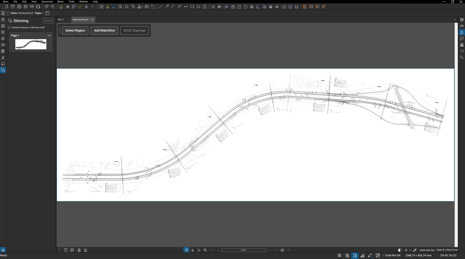 Data security and governance are key considerations for organisations adopting AI technologies, particularly in the construction industry where project information is often sensitive and commercially valuable. Bluebeam Max uses different processing models depending on the feature being used. Capabilities such as Smart Review, Smart Overlay, and Stitching are powered by Bluebeam's cloud-based AI infrastructure, which is regionally hosted within Europe. This helps support compliance, performance, and regional data management requirements.
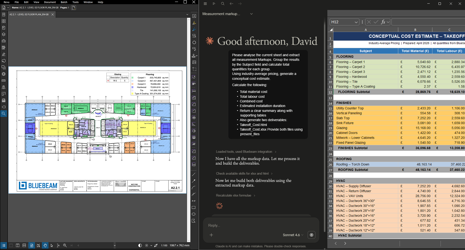 For AI integrations such as Claude, the model is slightly different. These integrations operate within the customer's own AI environment and are governed by the licensing terms, security controls, and data policies associated with that platform. As a result, different Bluebeam Max features may follow different data handling and processing frameworks. Bluebeam provides separate documentation for each service, allowing organisations to understand how data is stored, processed, and protected across the various AI-powered workflows. This flexible approach enables organisations to take advantage of AI-driven productivity while maintaining visibility and control over their data management and security requirements.
Are instructions saved between sessions?
Bluebeam Max retains context within an active session, allowing users to continue conversations and workflows without needing to repeat instructions or re-establish context each time they interact with the AI. However, instructions and prompts are not automatically carried over between separate sessions. For recurring tasks and standardised workflows, Bluebeam recommends using predefined prompts, project-specific templates, or documented guidance that can be reused as needed. This approach helps teams maintain consistency across projects while ensuring users remain in control of the instructions and information being shared with the AI. By establishing repeatable workflows, organisations can improve efficiency, reduce setup time, and achieve more consistent results when using Bluebeam Max.
Can Smart Review be customised?
At present, Smart Review uses a predefined set of AI-powered checks designed to help identify common issues within construction documents. These checks include areas such as duplicate drawing numbers, missing references, metadata discrepancies, and other potential inconsistencies that could impact project quality and coordination.
While Smart Review is designed to deliver immediate value through its built-in review criteria, users cannot currently create or apply their own custom audit rules. The focus of the current version is on providing a consistent, reliable review process based on commonly encountered document and drawing issues. For teams looking to streamline quality assurance and reduce manual review effort, these predefined checks can help surface potential problems more quickly and support a more efficient review workflow. As demand for greater flexibility continues to grow, customisation remains an area of interest for future development.
What happens to the original drawings when using Stitching?
Stitching creates a new, combined PDF without altering the original source drawings. This means project teams can bring multiple sheets together into a single continuous view while retaining the original files exactly as they were. The source documents remain available as separate reference files, providing reassurance that no original project information is modified or overwritten during the process. This allows teams to take advantage of a more streamlined viewing experience while maintaining document integrity and version control. Once the stitched PDF has been created, it can be reviewed and adjusted independently of the original drawings. This flexibility enables users to refine the combined document as needed without affecting the source files. By preserving the original drawings and generating a separate output, Stitching offers a safe and efficient way to improve navigation, coordination, and visibility across large or complex drawing sets.
How does Revit integration work?
Bluebeam's integration with Revit is delivered through Bluebeam Studio Sessions, helping bridge the gap between BIM workflows and PDF-based collaboration. By connecting the two platforms, project teams can improve coordination between design, review, and construction stakeholders without needing to work in the same application. The integration allows users working in Revit and Bluebeam Revu to collaborate more effectively by synchronising markups and status updates between the two environments. This creates a more connected workflow, ensuring that feedback and project information can be shared efficiently across teams while maintaining alignment between design models and construction documentation. For organisations using both Revit and Bluebeam, this integration helps reduce communication gaps, improve visibility into project changes, and support more streamlined review processes throughout the project lifecycle. Users will need the appropriate licences for the applications and features being used on each side of the integration to take full advantage of the connected workflow.
Conclusion
As the construction industry continues to embrace artificial intelligence, the focus is shifting from theory to practical applications that deliver measurable value. Bluebeam Max has been designed with this in mind, helping teams automate repetitive tasks, uncover insights within project documentation, and streamline review processes without compromising accuracy or traceability.
As these FAQs have shown, Bluebeam Max is more than just an AI assistant. From analysing scanned drawings and supporting multilingual teams to identifying document issues and improving BIM collaboration, it provides a range of capabilities that can help construction professionals work more efficiently and make better-informed decisions throughout the project lifecycle. Perhaps most importantly, Bluebeam has taken a practical approach to AI adoption, prioritising transparency, document-based analysis, and data security. This allows organisations to explore the benefits of AI with greater confidence while maintaining control over their information and workflows.
Whether you're looking to reduce manual effort, improve project coordination, or gain more value from your existing documentation, Bluebeam Max represents an exciting step forward in the evolution of digital construction.
Want to learn more?