
What’s New in Civil 3D 2027: A Guide to the Latest Features

Autodesk’s Civil 3D 2027 release introduces a range of updates to the core platform, with a strong focus on automation, performance, and documentation workflows. This section outlines the main new features, including AI-assisted design capabilities in preview, horizontal regression analysis, feature line and drainage design enhancements, and a series of incremental improvements aimed at streamlining day-to-day civil engineering production work.


Watch this video to see our consultant `Enrique Barriuso walk through the updates to the features within Civil 3D 2027.

This article covers:

  1. AI Autodesk Assistant
  2. Daylight Feature Line
  3. Horizontal Regression Analysis
  4. Autodesk Drainage Tools
  5. Summary
  6. See Civil 3D 2027's New Structural Features In Action
  7. Elevating Your Civil 3D skills
  8. How to Stay up to Date With the Latest Autodesk Software Releases

Autodesk AI Assistant

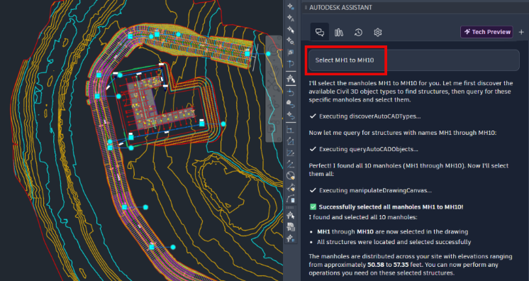
Currently offered as a tech preview, it provides the possibility to interact with the model using natural language through the use of AI. Some examples include checking the standards of a drawing against a standards file or selecting, querying and modifying styles of objects.

The chats will be saved in a library for future reference and frequently used individual prompts can also be saved for easy access and reusability. 

Daylight Feature Line

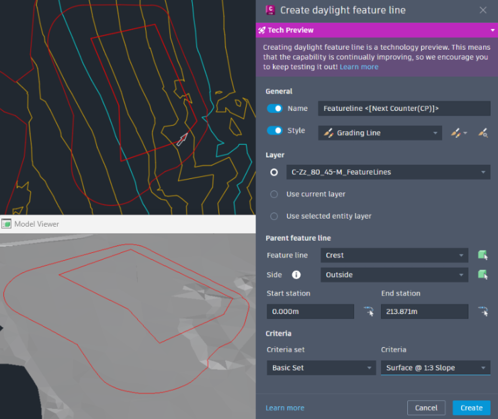
Daylight feature line is introduced as a new tool, currently in tech preview, which means it’s still improving. It streamlines the creation of feature lines by using the same grading criteria that is  available for grading creation tools.

You specify a parent feature line, grading criteria, name, style, layer, side and station range. The created feature line behaves like a standard feature line that you can edit using the usual tools. 

A caveat is that the created feature lines are not dynamically linked, which means that any changes to the parent feature line require to delete the previously created feature lines and run the tool again. For an improved workflow that keeps that dynamic link, you can check the dynamic line set tool in Naviate for Civil 3D: 

Horizontal Regression Analysis

This tool was released in Civil 3D 2026.1 and creates a best fit alignment based on COGO points, polylines or feature lines. Some key improvements have been introduced in Civil 3D 2027.

A new machine learning algorithm is offered as an alternative option that could provide a better fit in some situations. This AI model is pre-trained and does not use or learn from customer data.

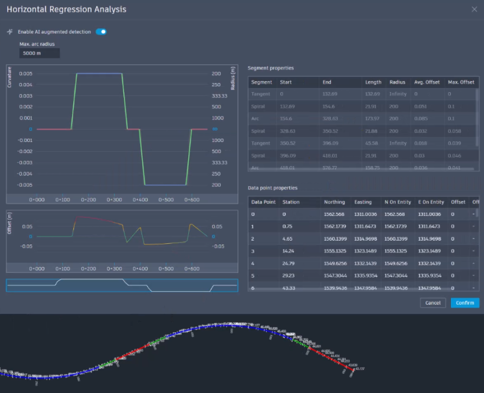
In cases where a manual workflow is desirable, Civil 3D now creates an alignment that you can preview and edit throughout the process. Modeless operation is supported, meaning that you can edit the alignment using alignment layout tools or grips while keeping the Horizontal Regression Analysis dialog box open.

Any changes made to the alignment will automatically display in the curvature and offset plots and in the tables. Selecting entities in any of the plots or tables will highlight the corresponding segment in the alignment; zoom to and pan to options are available in the segment properties table to help locate the corresponding segment in the alignment. 

Autodesk Drainage Tools

Introduced in Civil 3D 2026.2 as a production ready tool set, it provides InfoDrainage analysis capabilities within Civil 3D.

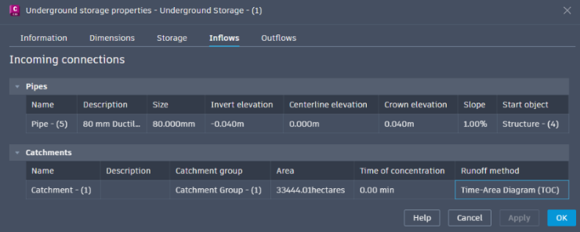
For underground storage objects, full connectivity is supported with pipes, structures, ponds and catchments. Any connected objects will display in properties and any changes in connectivity will update pipes and underground storage object properties in both directions. Connected ponds and underground storages can also be shown in pipe labels. 

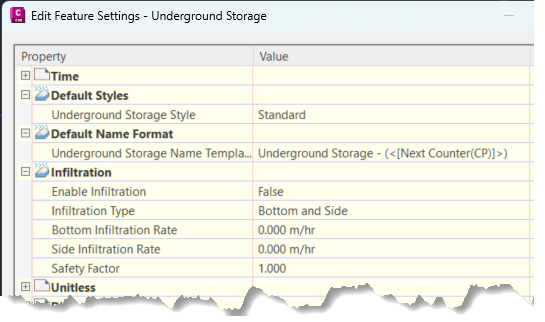
Default styles, name formats and infiltration parameters can be set through Toolspace – Settings – Underground Storage – Edit Feature Settings. 

For catchments, the FAA and Kirpich time of concentration methods have been added and the creation of flow paths and recalculation of slopes from a reference surface have been improved.

Channels support multiple slopes, which can be defined manually or taken from a profile or feature line, and sections can be imported from an assembly.

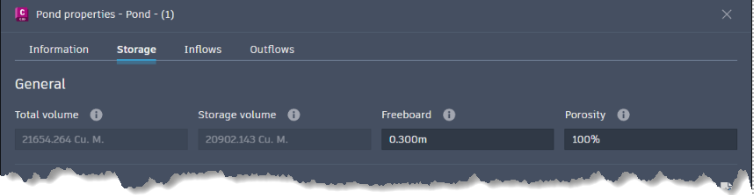
Ponds include a porosity option, and connected channels can be selected when configuring pond outlets. 

Summary

Autodesk Civil 3D 2027 delivers a series of practical enhancements aimed at making everyday civil engineering workflows faster, more efficient, and more reliable. With improvements across modelling, analysis, and documentation, alongside early AI-assisted capabilities The release focuses on streamlining design processes, reducing manual effort, and helping teams produce consistent, high-quality project outcomes.

Elevate Your Civil 3D Skills

To support these new Civil 3D 2027 capabilities, now is a great time to take advantage of our training opportunities. Whether you’re looking to refine your core Civil 3D skills or deepen your capabilities, we’re offering an exclusive 25% discount on any Civil 3D training course booked before 1st June.

When booking a training course on our website, please use the discount code: AUTODESK27

This is also an ideal opportunity to explore how complementary tools and structured workflows can enhance your Revit environment.

If you have any questions or would like help choosing the right training option, please contact us.

EXPLORE MORE AUTODESK 2027 SOFTWARE RELEASES

Contact Us

Need help deciding whether you should upgrade to the Civil 3D 2027 releases or need more help understanding how they can fit into your workflows? Get in touch below! 

You can also call us on 0345 370 1444  or email info@symetri.co.uk


What’s New in AutoCAD 2027: A Guide to the Latest Features

25 March 2026

AutoCAD 2027 introduces new tools to improve collaboration, drawing accuracy, and productivity, including Autodesk Forma data management integration, Geometry Cleanup, and the AI‑powered Autodesk Assistant. In this guide, we highlight the key AutoCAD 2027 updates and explain how they support more efficient, connected workflows for design teams.

What’s New in Revit Structure 2027: A Guide to the Latest Features

25 March 2026

Autodesk's 2027 release continues its focus on deepening Revit's structural capabilities, with meaningful updates across reinforced concrete, analytical modelling, and steel detailing. Here's a technical breakdown of what's changed and what it means for your workflows and productivity.