

How Company Certification Has Evolved
Ten years of BIM certification experience. Learn how ISO 19650 certification has matured, its business benefits, and when organisations are ready.


Autodesk Inventor 2027 leans heavily into AI and automation, with Autodesk clearly focusing on tools that reduce repetitive tasks and make it easier for designers and engineers to work smarter, not harder. The update includes improvements across the platform, from Content Centre enhancements to visual coding tools, and the introduction of Autodesk Assistant, an AI agent built directly into Inventor. Alongside these major updates come several smaller but genuinely useful additions, including a redesigned slot tool and better ways to work with point cloud data.
This article covers:
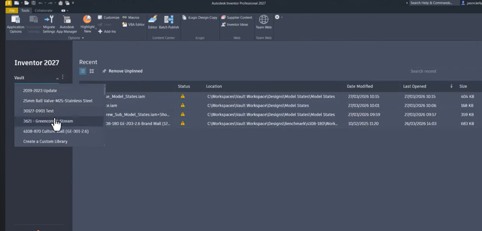
One of the standout updates is the ability to publish and use assemblies inside the Content Center. Until now, Content Center has been a library of standard‑driven part files like fasteners, fittings, washers, and components used in the Tube & Pipe and Frame Generator environments. With Inventor 2027, Autodesk has added a publish option that supports the use of assemblies in the content centre. It now becomes possible to store default assembly starting points, such as a core product that gets customised regularly or commonly reused purchased assemblies. The placement options remain familiar, allowing assemblies to be placed as standard or custom items. It’s a subtle change but one that gives Content Center a new relevance.
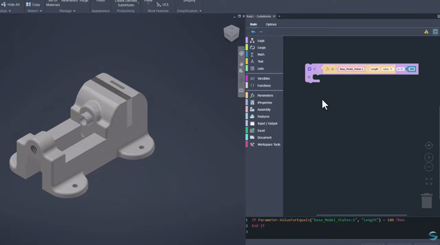
iLogic also receives a meaningful upgrade with the introduction of Codeblocks, a visual block‑based way of creating iLogic rules. This approach will feel familiar to anyone who has used Blockly or similar visual coding environments, making rule creation far more approachable for designers without a programming background. Codeblocks separate user input from model actions, improving readability and making rules easier to maintain. For teams building configurators or option‑driven models, the clarity and accessibility these blocks offer will likely encourage far wider use of iLogic across organisations. Importantly, the system still generates text‑based rules in the background, so experienced users don’t lose any flexibility.
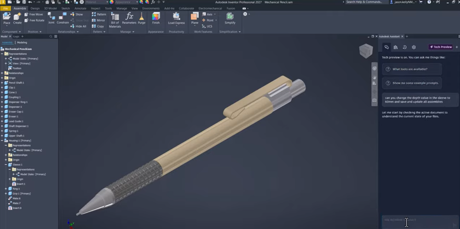
The most significant change to this release is Autodesk Assistant, the AI agent now built into Inventor and several other Autodesk products such as Vault, Revit, and Fusion. Rather than acting as a simple help tool, the Assistant can interpret natural‑language instructions and directly interact with the model. It can adjust iProperties, modify parameters, manage Model States, create PDF drawing packs, run iLogic rules, draft supplier emails. Because the assistant can access the Inventor API, many of the tasks users once had to script manually can now be triggered by a simple prompt. The tool also stores conversation history, making it easy to reuse prompts or create predefined commands.
Among the additional tools worth noting is the new slot feature. Slot creation is now more intuitive, using a modernised property panel similar to the hole command. Designers can define slot size, orientation, and placement more efficiently, and the feature works consistently across part and assembly environments. Slot annotations are also available in drawings, making the workflow more complete from design through to documentation.
Point cloud management has also been improved, offering smoother navigation and better control. Users can now create section views directly from point clouds, adjust point sizes through the navigator, align coordinate systems, and undo crop operations. Inventor 2027 also allows point clouds to appear on drawings, which makes documenting scanned environments significantly easier.
Alongside these headline features, the release also supports workflows like sketch‑driven assembly patterns, new options for managing assembly folder structures, and improved interoperability between Inventor and Revit. Altogether, Inventor 2027 feels like a focused, well‑rounded update that enhances automation, increases accessibility to advanced tools, and introduces AI‑driven workflows that will only get stronger over time.
To help you get the most from Inventor, we offer a range of expert-led training courses designed to enhance your skills, improve productivity, and help you work more efficiently.
Whether you're looking to build a stronger foundation or develop more advanced design and engineering capabilities, our training can help you get greater value from your software investment.
Visit our Inventor training page to explore the available courses.
Need help deciding whether you should upgrade to the Autodesk 2027 releases or need more help understanding how they can fit into your workflows? Get in touch below!
You can also call us on 0345 370 1444 or email info@symetri.co.uk
Ten years of BIM certification experience. Learn how ISO 19650 certification has matured, its business benefits, and when organisations are ready.

Digital transformation is reshaping the built environment, but successful change requires more than new technology. Discover how Symetri's approach to BIM, digital delivery and organisational change has earned four nominations at the 2026 Building Innovation Awards.
If you're new to Bluebeam Max or simply want to learn more about what it can do, we've gathered answers to the questions we're asked most often.