Property Improvements
Physical Properties from Inventor into Vault: You can now map physical properties such as mass, volume, and area directly from Inventor into Vault. This functionality ensures critical design data is consistently available in Vault
More Control in Copy Design: The Copy Design dialog has been enhanced so you can edit properties before executing the copy. Whether you’re adjusting part numbers or adding supplier information, this helps ensure new designs are correct from the outset and reduces rework later.
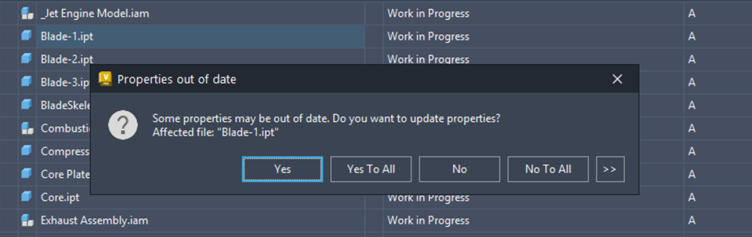
Property Synchronisation When Opening Files: When opening a file directly from Vault, users are now prompted synchronise properties immediately after check-out. Previously, this only happened when opening design files via the CAD application. This change helps maintain consistency, regardless of how users access files.
Vault Feature Improvements
Vault 2027 also includes a number of practical enhancements that make it easier to work efficiently.
Higher‑Resolution Thumbnails
File thumbnails now display at higher resolution. This makes it easier to visually identify files without opening them saving time and reducing mistakes.
Improved Job Queue Visibility for Administrators
A new Workgroup column in the Vault Job Queue allows administrators to identify the source of a job in the queue. This is especially valuable in replicated or multi‑server environments and simplifies troubleshooting and job management.
Multi‑File Open Support
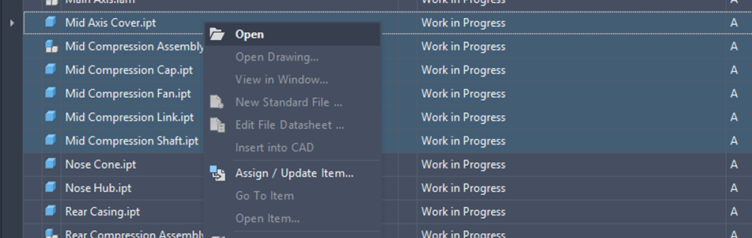
Users can now open multiple files at once directly from the Vault Client, including Inventor parts and drawings. This is ideal speeding up the design process.
Note: bulk opening is limited to files from the same source application.
More Efficient Printing with Plot Manager Enhancements
Printing and publishing often involve repetitive manual steps. Vault 2027 streamlines this workflow further with improved Plot Manager functionality.
By selecting an assembly and choosing Plot Related File Sheets, Vault automatically gathers all associated drawings into Plot Manager. From there, you can batch print to PDF, define sheet sizes, save plotting lists, and print efficiently and consistently.
You can also choose Plot Related Design Representation Files to access and print all PDFs linked to an assembly quickly. This is particularly useful for manufacturing or reviewing packages.
Strong Vault and PLM Integration
Vault 2026 introduced the Fusion Connector, enabling a connection between Vault and Autodesk Fusion Manage. In Vault 2027, this integration becomes easier to use and more accessible.
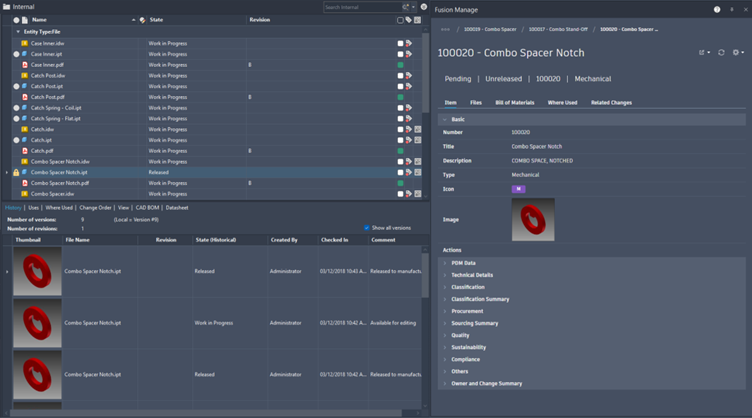
The Fusion Manage window within the Vault client has been refined to make navigation and browsing simpler. Users can view, Item data, PDM information, and property and lifecycle data
All without leaving Vault while maintaining synchronisation between Vault and Fusion Manage.
At Symetri we offer additional solutions like the Sovelia Connector, and our own PLM solution, Sovelia Core, providing additional options for organisations implementing PLM strategies. We help customers choose the right approach based on their processes and business goals.
Autodesk Assistant - AI support inside Vault Professional
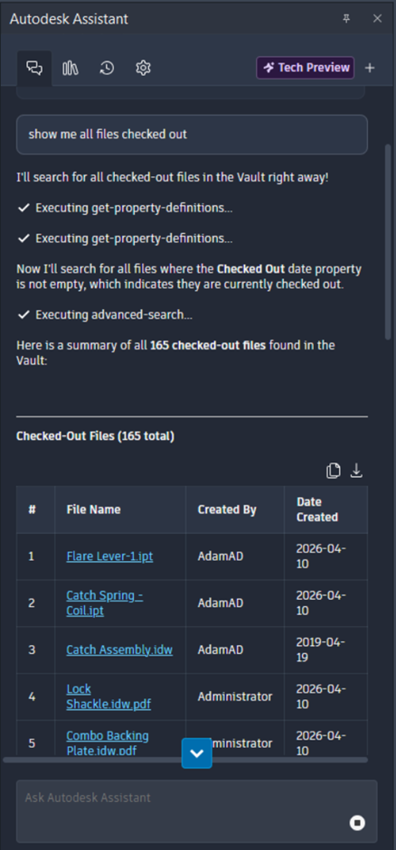
One of the most notable additions in Vault 2027 is the Autodesk Assistant. An AI‑powered tool that allows users to interact with Vault using natural language.
With Autodesk Assistant you can ask how specific features work (for example, “Explain Copy Design”) or search for data using plain‑language queries. For example, asking: “Show me all files checked out by this user”
This has the potential to significantly reduce time spent searching for information and lower the barrier for new or occasional Vault users.
Autodesk will continue adding more enhancements to the Autodesk Assistant over time.
Autodesk Vault 2027 delivers meaningful, practical enhancements that support real engineering and data management workflows. From improved property handling and usability gains to deeper PLM integration and AI‑driven insight, this release is about helping teams work more efficiently and with greater confidence in their data.
At Symetri, we can help you upgrade and help you get value from your design data. If you are exploring Vault 2027, considering PLM, or looking to optimise existing workflows, our experts can help you define and implement the right solution.
Get in touch with Symetri to discuss upgrading to Autodesk Vault 2027 and how Autodesk and Sovelia solutions can support your company’s design data workflows.
If you have any questions, please contact us .



