

How Company Certification Has Evolved
Ten years of BIM certification experience. Learn how ISO 19650 certification has matured, its business benefits, and when organisations are ready.


Watch this video to see our consultant Lawrence Hooker walk through the updates to the structural features within Revit 2027.
This article covers:
Model queries - interrogate the model without manually navigating the project browser or running schedules
View and sheet generation - create documentation through conversational commands
Workflow guidance - contextual suggestions for completing tasks
This sits alongside early MCP (Model Context Protocol) server functionality, which hints at more extensible AI integration in future releases.
The Revit Structure 2027 release provides some great updates in concrete modelling and reinforcement. All the concrete modelling features are now consolidated in the new dedicated Concrete tab.

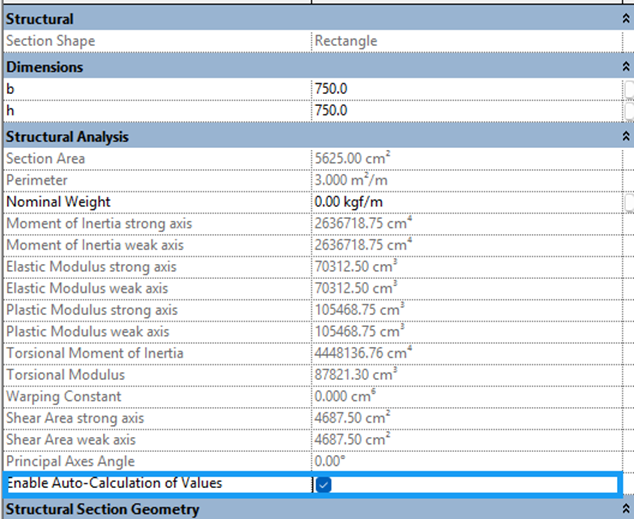
Concrete columns and beams can now have their structural properties — moment of inertia, section modulus, and so on — automatically calculated from the member's cross-sectional shape and size. Properties can still be manually overridden by unchecking the auto-calculation option.
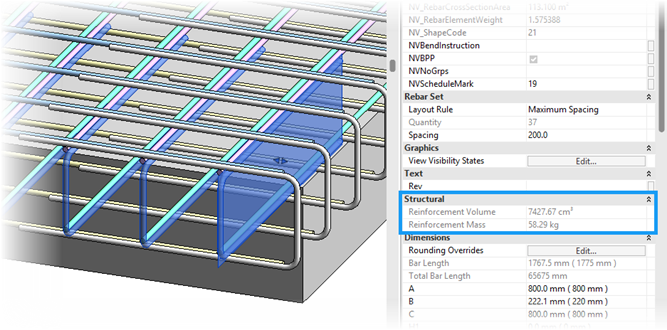
The reinforcement mass is now calculated for all rebar, enabling the production of all required bending schedules to display the weight of steel. This will also help with carbon calculations and construction site safety.
The morphed free form tool makes the modelling of transverse rebar much simpler allowing the user to simply select the reinforcement parallel to the view. The transverse rebar is then populated either across a single segment or the entire length of the bar.
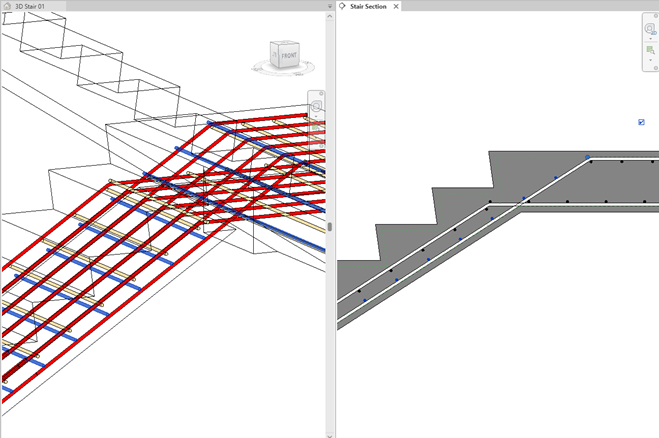
The morphed free form and path free form toolsets provide a robust set of tools to reinforce civil structures such as bridges, tunnels and complex concrete shapes.
When working with rebar sets, a new layout rule is available greatly improving the way we can reinforce beams and columns. The new layout rules allow for differing ranges within the same rebar set.
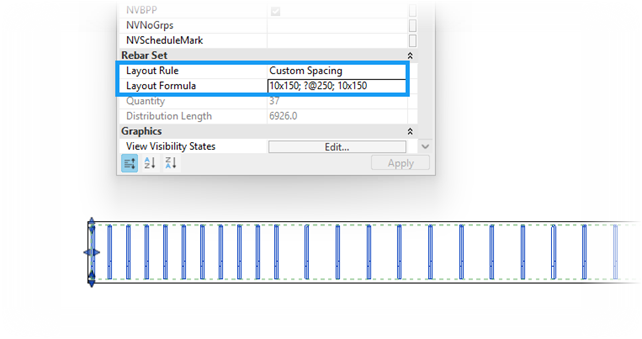
The Layout Formulae can take the following formats:
|
Format |
Example |
|
Number of spaces x Spacing |
3x100; ?x200; 5x100 |
|
Length @ Spacing |
1400@100;900@300 |
|
Percentage of set Length |
33%@100;?@200;33%@100 |
Of course, the formulae enables complete parametric updates when concrete members are edited. New built-in parameters also control how a formula driven rebar set is tagged and detailed.
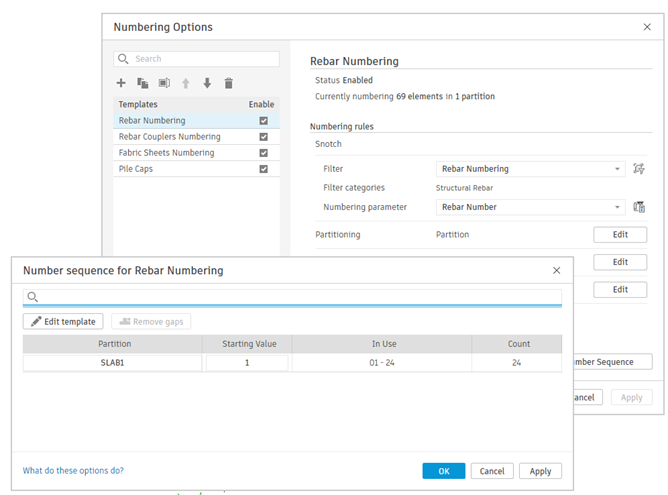
The traditional reinforcement numbering methodology has been discontinued. The Rebar Number built-in parameter is now editable and driven by a centralised Numbering tool in the core Revit software, bringing rebar numbering in line with how other elements are managed across the platform.
Analytical panels can now be split into sub-panels by selecting grids, levels, sketch lines, or the edge of an adjacent analytical member. This is particularly useful when a structural slab or wall spans multiple bays but requires discrete panels for load application or engineering analysis.
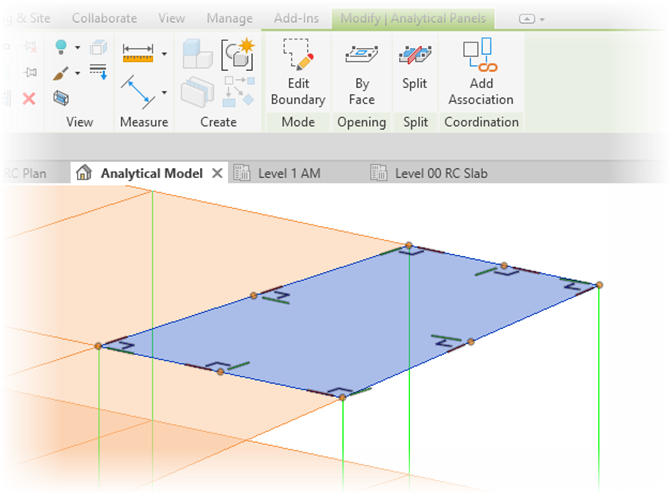
Automatic Material Thickness
When associating an analytical panel with a physical floor or wall, Revit now automatically assigns the structural material thickness, excluding non-structural layers such as blinding. This reduces manual data entry and improves accuracy when transferring models to analysis software.
Wind loads can now be modelled directly in Revit and applied using the new cladding role. For complex roof and façade arrangements you can use Dynamo to automate the modelling of the panels. Loads can now also be applied across multiple panels.
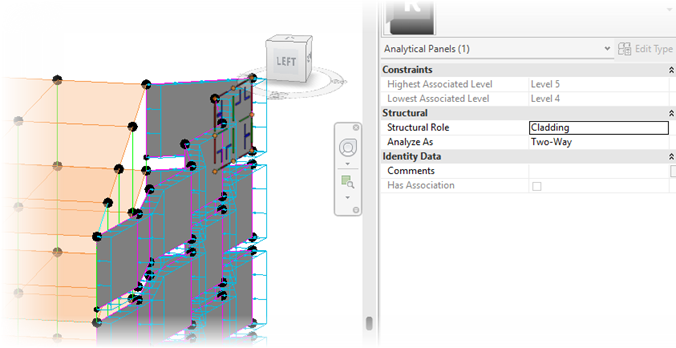
Analytical Automation and Pinning
The analytical model now supports automatic synchronisation with the physical model helping to keep both synchronised. Elements can be pinned to freeze their analytical position if manual control is needed, for example where beams or columns should not follow panel movement.
Analytical nodes can also be un-hosted from their connected elements, addressing cases where connectivity should not drive geometry.
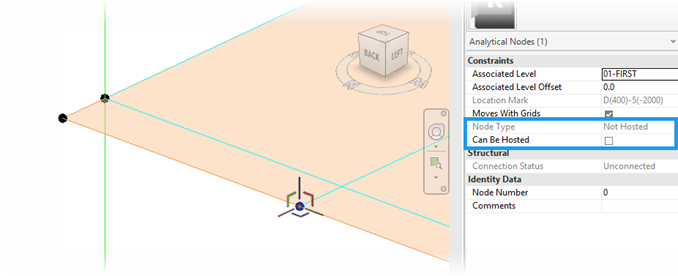
The 2027 release lays groundwork rather than delivering finished steel detailing functionality. Standard editing commands - cut, notch, and structural openings - can now be applied to fabrication elements (steelwork modified via the Steel tab). Previously, these operations were restricted to native Revit elements.
This is explicitly foundational work: the unified editing environment this creates is intended to support full steel modelling and detailing workflows in future releases.
Structurally, the 2027 release prioritises two things:
The rebar formula toolset and morphed free form improvements are immediately useful for bridge and tunnel reinforcement. The analytical automation and wind load features move Revit closer to serving as a single model environment across design and analysis. Steel detailing remains a work in progress, but the editing improvements suggest the platform is being prepared for a more significant update.
The Autodesk Assistant is worth monitoring - particularly the MCP server functionality - as the interface between natural language and model data matures and offers additional functionality!
To help you get the most from Revit Structure, we offer a range of expert-led training courses designed to strengthen your structural design skills, improve project efficiency, and help you work more effectively with the latest tools and workflows.
Whether you're looking to build on your existing knowledge or develop more advanced capabilities, our training can help you get greater value from your software investment.
Visit our Revit training page to explore the available courses.
Need help deciding whether you should upgrade to the Revit 2027 releases or need more help understanding how they can fit into your workflows? Get in touch below!
You can also call us on 0345 370 1444 or email info@symetri.co.uk
Ten years of BIM certification experience. Learn how ISO 19650 certification has matured, its business benefits, and when organisations are ready.

Digital transformation is reshaping the built environment, but successful change requires more than new technology. Discover how Symetri's approach to BIM, digital delivery and organisational change has earned four nominations at the 2026 Building Innovation Awards.
If you're new to Bluebeam Max or simply want to learn more about what it can do, we've gathered answers to the questions we're asked most often.