
How Company Certification Has Evolved
Ten years of BIM certification experience. Learn how ISO 19650 certification has matured, its business benefits, and when organisations are ready.


In the world of architectural visualisation and 3D design, speed and realism are everything. Chaos offers two powerful real-time tools - Enscape and Vantage - that help professionals bring their ideas to life, but they serve very different purposes.
Enscape is built for architects and designers who need instant, immersive presentations directly inside their CAD or BIM software, while Vantage is designed for visualisation specialists who want to explore large, detail-rich V-Ray or Corona scenes with full ray tracing.
Understanding the strengths of each tool is key to choosing the right solution for your workflow, whether you’re presenting a concept to a client or navigating a cinematic-quality environment.
Below we explore their key differences.
Chaos Enscape is built as a plugin for CAD and BIM platforms like Revit, SketchUp, Rhino, Archicad, and Vectorworks. Its strength lies in ease of use - designers can instantly turn their models into immersive 3D walkthroughs without exporting or complex setup.
The designer has direct access to an instant visual of their Revit building, which can be enhanced with Enscape's extensive assets and materials.
Key Features:
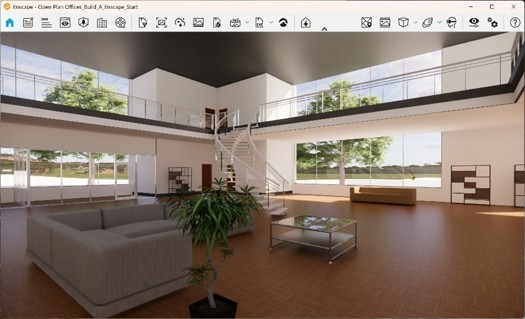
These key features work together to deliver an immediate and impressive spatial understanding of the environment. Real‑time rendering in VR - enhanced with assets such as people to convey scale and line of sight - creates an immersive experience that can be easily shared with clients through videos, panoramas, and interactive links.
Benefits:
Chaos Vantage is designed for exploring V-Ray and Corona-authored scenes in real time. Unlike Enscape, which prioritises simplicity, Vantage emphasises visual fidelity and scalability. It requires a DXR-compatible GPU (like NVIDIA RTX) to deliver smooth, ray-traced navigation.
Key Features:
 This powerful visualisation tool allows you to build rich, organic environments and see them rendered in real time with global illumination and ray‑traced lighting. With Chaos Vantage, GPU RT cores, and Nvidia DLSS, we’re achieving broadcast‑level visuals right from the desktop.
Benefits:
Both tools accelerate visualisation workflows, but they shine in different contexts. Enscape bridges design and presentation, making it easy for architects to communicate ideas. Vantage bridges rendering and exploration, giving professionals the ability to navigate massive, detailed scenes with cinematic realism.
This blog is the second in a four part series:
Ten years of BIM certification experience. Learn how ISO 19650 certification has matured, its business benefits, and when organisations are ready.

Digital transformation is reshaping the built environment, but successful change requires more than new technology. Discover how Symetri's approach to BIM, digital delivery and organisational change has earned four nominations at the 2026 Building Innovation Awards.
If you're new to Bluebeam Max or simply want to learn more about what it can do, we've gathered answers to the questions we're asked most often.