Bluebeam Max FAQs | Your Guide to AI-Powered Construction Workflows
If you're new to Bluebeam Max or simply want to learn more about what it can do, we've gathered answers to the questions we're asked most often.



As of 15th July 2019, Autodesk added the ability to report on seat usage. This enables Autodesk contract administrators to see licence activations and frequency of use. The following offers a quick overview of the features and potential implications.
The new reports can be found when signing into your Autodesk Account at accounts.autodesk.com, under the reporting section a new option will be available, “Seat Usage”. It is worth noting that these reports currently only apply to single-user licences and some products may not be reported. You can see the current exclusion list at knowledge.autodesk.com/customer-service/account-management/users-software/reporting/product-usage-reporting
The first section, “summary”, displays your total number of users, number of unique products used and your total seat count. A user is counted once they have been assigned a licence, installed and opened the product. Allowing you to see your total seat count and users on one report, offers some valid insight as to whether you are oversubscribed or on the brink of needing more licences.
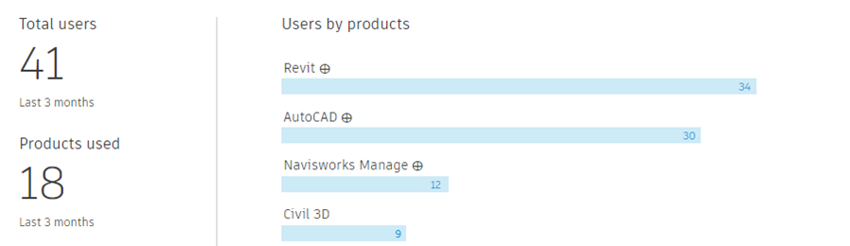
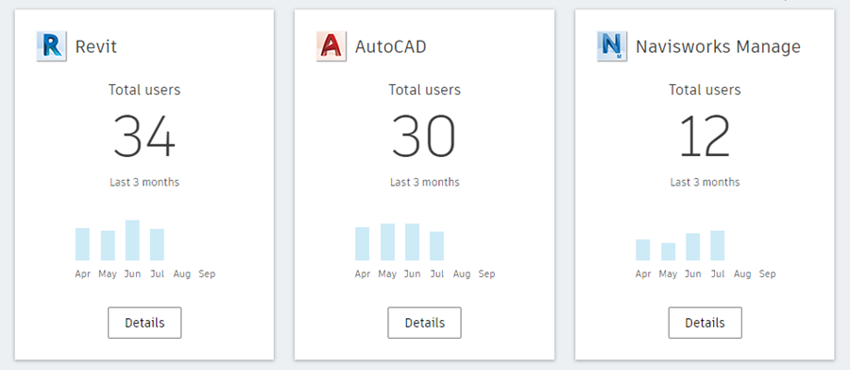
Things get a little more interesting when you select the “By Product” tab. This shows once again, number of users over a time period, but allows you to drill down to the frequency of use and even what version is being accessed.
So, two things here. Firstly, the frequency of use. This is a great insight to have. Let’s say you have 10 Navisworks Manage licences for 10 users as they are all adamant, they need access to the product. This will identify how often users are accessing the product, allowing you to make an informed decision. In the scenario given, you find that although all your users are using Navisworks, their access report shows only one day a week. In my opinion, this makes 10 single-user licences seem like overkill. I’d be inclined to replace those licences with a few multi-user licences – although more expensive per unit, the overall cost would be significantly less without sacrificing access.
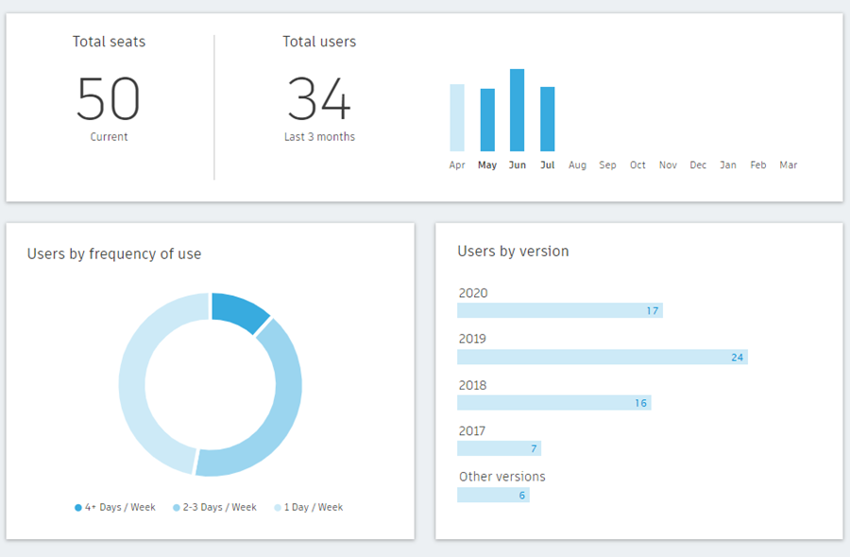
The second useful element here is “users by version”. From a compliance perspective, it is insightful to know who has what version installed. This could be external compliance or even project/company stated policies. It’s a good way to police what is being used. This can support you in cleaning up unnecessary installations and removing the risk of accidentally starting projects in the wrong version or even ensuring you are not installed beyond your entitlement, thus preventing a compliance risk.
One thing that could make this even better, would be the ability to see what PC/user each of these relates to, however this is not currently possible. You can export the results to analyse them further – something I would recommend when you are reviewing your portfolio and considering your requirements.
It is pleasing to see developments on the Autodesk Account continue – any additional insights/functionality can only be a good thing.
If you would like further information on Autodesk Account updates, feel free to contact us
If you're new to Bluebeam Max or simply want to learn more about what it can do, we've gathered answers to the questions we're asked most often.

Learn how PLM ERP integration creates a digital thread, unifying engineering and manufacturing. Explore PLM vs ERP and how connected systems improve collaboration.

Learn how to protect your organisation from QR code phishing, adopt passkeys securely, and manage AI note-takers with the latest IT security advice from Symetri.